• Home
  • About
    • General
    • Team
    • Contributors List
    • Academic Writing Month (AcWriMo)
    • AcWri Twitter Chats
  • Journal Articles
    • Journal Article Literature Review
    • Journal Article Abstracts
    • Journal Article Editing
    • Journal Article Marketing and Impact
    • Journal Article Planning
    • Journal Article Writing
    • Journal Article Peer Review
  • Books
    • Book Literature Review
    • Book Editing
    • Book Marketing and Impact
    • Book Planning
    • Book Proposals
    • Book Publishing
    • Book Writing
  • Conference Papers
    • Conference Paper Literature Review
    • Conference Paper Abstracts
    • Conference Paper Editing
    • Conference Paper Marketing and Impact
    • Conference Paper Planning
    • Conference Paper Presenting
    • Conference Paper Writing
  • Grants
    • Grant Literature Review
    • Grant Abstracts
    • Grant Completion Reporting
    • Grant Impact Statement
    • Grant Methods Section
    • Grant Writing
    • Reseach Project Planning
  • Digital Publishing
    • Blogging and Social Media
    • Experimental Digital Publishing
    • Open Access
  • Academic Practice
    • Collaboration
    • Citations and Referencing
    • Networking
    • Productivity
    • Reading and Note-Taking
  • Resources
    • Websites
    • Tools
      • The PhDometer 3.0
  • Community
    • Contributors List
    • Academic Writing Month (AcWriMo)
    • AcWri Twitter Chat
  • Contact
  • Home
  • About
    • General
    • Team
    • Contributors List
    • Academic Writing Month (AcWriMo)
    • AcWri Twitter Chats
  • Journal Articles
    • Journal Article Literature Review
    • Journal Article Abstracts
    • Journal Article Editing
    • Journal Article Marketing and Impact
    • Journal Article Planning
    • Journal Article Writing
    • Journal Article Peer Review
  • Books
    • Book Literature Review
    • Book Editing
    • Book Marketing and Impact
    • Book Planning
    • Book Proposals
    • Book Publishing
    • Book Writing
  • Conference Papers
    • Conference Paper Literature Review
    • Conference Paper Abstracts
    • Conference Paper Editing
    • Conference Paper Marketing and Impact
    • Conference Paper Planning
    • Conference Paper Presenting
    • Conference Paper Writing
  • Grants
    • Grant Literature Review
    • Grant Abstracts
    • Grant Completion Reporting
    • Grant Impact Statement
    • Grant Methods Section
    • Grant Writing
    • Reseach Project Planning
  • Digital Publishing
    • Blogging and Social Media
    • Experimental Digital Publishing
    • Open Access
  • Academic Practice
    • Collaboration
    • Citations and Referencing
    • Networking
    • Productivity
    • Reading and Note-Taking
  • Resources
    • Websites
    • Tools
      • The PhDometer 3.0
  • Community
    • Contributors List
    • Academic Writing Month (AcWriMo)
    • AcWri Twitter Chat
  • Contact
Exact matches only
Search in title
Search in content
Search in comments
Search in excerpt
Search in posts
Search in pages
Search in groups
Search in users
Search in forums
Filter by Categories
Academic Practice
Academic Writing Month
AcWri
AcWriMo
Blogging and Social Media
Book Editing
Book Literature Review
Book Marketing and Impact
Book Planning
Book Proposals
Book Publishing
Book Writing
Books
Citations and Referencing
Collaboration
Community
Conference Paper Abstracts
Conference Paper Editing
Conference Paper Literature Review
Conference Paper Marketing and Impact
Conference Paper Planning
Conference Paper Presenting
Conference Paper Writing
Conference Papers
Digital Publishing
Experimental Digital Publishing
Grant Abstracts
Grant Completion Reporting
Grant Impact Statement
Grant Literature Review
Grant Methods Section
Grant Writing
Grants
Journal Article Abstracts
Journal Article Editing
Journal Article Literature Review
Journal Article Marketing and Impact
Journal Article Peer Review
Journal Article Planning
Journal Article Writing
Journal Articles
Networking
News
Open Access
Productivity
Reading and Note-Taking
Reseach Project Planning
Resources
Tools
Uncategorized
Website
PhD2Published
TOOLKITSTOOLKITS LEADER BOARDLEADER BOARD LATESTLATEST ABOUTABOUT
← Previous Entries
Josie Dixon – From Planet PhD to Destination Publication: A Traveller’s Guide. Part 5. Features vs Benefits

Image from christmasstockimages.com http://christmasstockimages.com/free/ideas_concepts/slides/festive_gifts.htm

This post is the fifth in a series by Josie Dixon, a consultant with 15 years’ experience in academic publishing, as Senior Commissioning Editor at Cambridge University Press and Publishing Director for the Academic Division at Palgrave Macmillan.  She now runs her own business, Lucian Consulting, and gives training workshops on publishing and other forms of research communication for postgraduates, postdocs and staff in over 50 universities internationally, alongside her training and consultancy work in the publishing industry. In this set of blog posts for PhD2Published, Josie examines some of the polarities between Planet PhD and the world of publishing, and offers strategies for how to bridge the gap. 

In the first post of this series, I took as my starting point the importance of recognising that publication is inevitably a commercial activity.  Pitching a book to potential publishers involves a degree of salesmanship, which doesn’t always come naturally.  In the publishing workshops I give for early career researchers, participants do an exercise in pairs, much like the well-known ‘elevator pitch’ in which entrepreneurs must make a concise and compelling case for the value of their enterprise to an investor.  The process of seeking a publisher for a book is, if you like, a kind of Dragon’s Den, in which presses will be looking for projects which will repay their investment.  Doing the exercise in pairs ensures not only that participants produce their own sales pitch, but also that they get to be a consumer of someone else’s, to encourage critical thinking about how the case for publication may look to an outsider.

This commercial turn is not about selling out on your academic values, but encouraging others to buy into the importance of your research.  It’s a difficult transition because most academics dislike the idea of having to market their work.  For some this spills over into disdain for anything so vulgar as promotion, and even a sense of hostility towards commercial values.  In an article in the TLS, addressing the recent controversies in the UK surrounding the introduction of impact as a criterion for funding research, Stefan Collini set out a dystopian future in which academics will have to become ‘accomplished marketing agents’ and ‘door-to-door salesmen for vulgarised versions of their increasingly market-oriented products’.  Collini’s desire to defend the independence of academic research and stand up for the cultural values of the humanities is of course commendable.  But it’s interesting that he sets this in such bitter opposition to a pejoratively framed notion of marketing and commercialisation.  I recognise in this a familiar, deep-rooted cultural cringe, most pervasive in the arts and humanities, based on the sense that scholarship and business are not just different worlds, but mutually hostile value systems.

Working in publishing has increased my respect for what marketing can do, in finding wider audiences – bringing greater recognition and impact – for academic research.  In retrospect, one of the most important lessons came surprisingly late in my publishing career, when as a publishing director I sat in on a copy-writing workshop run for my team of editors by the marketing department.  Our marketing manager spelled out a fundamental law of salesmanship – basic stuff in the shopping mall but a new way of thinking to most ivory-tower types.  This was the difference between features and benefits.   Features describe the characteristics of what you are trying to sell – for a book this might involve the content, coverage and approach, all of which is a good start but could still provoke the ‘so what?’ response in a jaded sales rep, bookseller or customer.  Benefits go further and make a more effective sales pitch, by making explicit how those elements will be useful and beneficial to the reader (whether in scholarly, pedagogical or even non-academic terms).   These might be methodological tools or analytical models with transferrable applications, new resources for further research, insight and guidance for policy-making, information and techniques for professionals and practitioners, and so on.

My experience is that most academics can elaborate for hours on the features of their work, but find it surprisingly difficult to articulate the benefits.   You would not sell a disposable coffee cup on the basis that it was made of cardboard (a mere feature), but rather by pointing out that it was heat-resistant and recyclable (two resulting benefits).  When you put together a book proposal you will likewise need to articulate not only the features but crucially the benefits of your research for your prospective readership.

Here are five tips to help you make this transition effectively:

i) Work out the features of your project – as many as you can think of!

ii) Convert each one into a benefit – explain why and how it will be of use to your readers

iii) Clarify who will benefit– e.g. researchers, teachers, professionals, practitioners, policy makers, or any other stakeholders you can identify.

iv) Concentrate on those benefits which are unique to your research

v) Be concise in communicating this as part of a publishing proposal – can you distill them into bullet points couched in terms that are accessible to non-specialists, rather than burying them in more elaborate, detailed or technical description of your research enterprise?  This will help to highlight your USPs more convincingly (see tips in Blogpost 1 in this series) and make clearer the reasons to publish your work.

Good luck!

The PhDometer 3.0

We are super excited (and only a little nervous) to announce:

THE ALL NEW PHDOMETER!

which, by the way, is also:

 THE ALL NEW WAY TO PARTICIPATE IN AcWriMo!

See, we solve all your productivity issues in one go!

The PhDometer 3.0 (pronounced F’dometer) has had a major tune up. It still has all your favourite features, but now you can name the various projects you are working on, pause one and work on another, and monitor your progress in different writing activities from note taking and writing to editing.

You can use The PhDometer 3.0 any time, but during November, when you click to share your results they’ll be added to the public leader board (think accountability spread sheet, but snazzier!). And of course you can still announce every achievement on Twitter but now we’ve also added Facebook too!

It’s pretty easy to find your way around The PhDometer 3.0, but to give you a bit of extra help, there’s a visual guide to the new features below. And the precious links you’ll be needing are right here and hey guess what?! It’s free!!!!


System Requirements
Mac Os X 10.7.4 ( Lion ) and later or Windows XP and later

Mac OS Link

Mac OS Installation
– Download the dmg and double click.
– Drag the app into your applications folder.
– Try to run it.
– Your Mac will probably refuse to run it ( because it has been downloaded ).
– If it just says “Are you sure?”, then say “Yes”.
– Otherwise, you will have to go to System Preferences > Security & Privacy
– In the General Tab, check Allow Apps Downloaded From  Appstore and identified developers
– Copy the contents to your Applications or Utilities folder
or
– You may have the option of allowing PhDometer to run.
– Whilst you are in Security & Privacy go to the Privacy Tab, click on Accessibility and Add PhDometer to the list.

Windows Link

Windows Installation
– Download the msi and double click.
– Click ‘Run anyway’.
– Find the app in the ‘Start Menu’.


Guide
  1. Create your PhDometer 3.0 account*.RegisterCreate an Account
  2. Go to ‘Activity’ and enter the name of your academic writing project.Project Name
  3. Select the writing activity type.Writing Type
  4. Go to ‘Settings’ and set any word count goals for your writing session.Word Count Goals
  5. Click the arrow and get writing!Click to Start
  6. You can press pause at any time or switch writing projects or activity typesPauseNew Activity
  7. You can check the number of words you have typed and words per minute anytime you want.Number of WordsWords/Minute
  8. You can view all your projects under ‘my activities’.My Activities
  9. To use the PhDometer 3.0 for AcWriMo you will need share your activity/activities when prompted. Then you will find your updates on the public ‘leader board‘*.ShareLeaderboard

*Please note that we require you to set up an account to use the PhDometer 3.0 but no personal details will be shared. The ‘leader board‘ will simply feature your username and progress.

Support
This is a free app and does not come with technical support services. Please follow the set up instructions carefully. If you still have an issue please try to uninstall and reinstall, check your computer settings, and also search for advice on the internet. One of the issues we have heard with Windows users can be solved by following the instructions on this Microsoft help page.

We are not set up for refunds if you purchase the OLD version of the PhDometer by accident. But we will be extremely grateful for the donation which supports everything we give away for free – like the NEW PhDometer.

My Love Affair with Mendeley or How Mendeley Is Basically My Brain – Part 3 by Minka Stoyanova

minka 2A revolutionary optimist and expert procrastinator, Minka Stoyanova subscribes to Wheaton’s Law, believes that brie and red wine will solve most of life’s problems and likes to pretend she is working towards a PhD at City University of Hong Kong’s School of Creative Media.


WHAT’S WRONG WITH MENDELEY — and how to get around it.

minka 9

Mendeley is by far the best research management tool I have found to date, however there are some aspects of its complete research suite that some users might find challenging.

THE CONS

PDFs

Everything I have mentioned works best for pdfs and can have limited or no functionality for other file types. This means that users might have to convert documents, particularly e-reader formats to pdf in order to reap the full benefits of Mendeley (I find Adobe Acrobat and Calibre to be powerful conversion tools).  

OCR

Additionally, Mendeley has no integrated OCR functionality, so image pdfs (such as scanned book chapters) should be run through an OCR tool (like Adobe Acrobat) before being added to the Mendeley library or the document content will likely not be catalogued by Mendeley’s crawlers.  

DUPLICATION

If users want direct access (i.e. not through Mendeley) to their files through cloud servers, but also want Mendeley on any one of their devices to import documents via the “watch folder,” duplicate documents will be created in the Mendeley database.  This is because each device recognizes the new content in the watch folder as new, to that device — and thus adds the content to the Mendeley library. As a fix for this, Mendeley does include a powerful tool for merging duplicate documents, but some users might find the process annoying and/or time consuming.  

SYNC

Sync, sync, and sync again.  Mendeley only automatically syncs libraries upon opening the application. Thus, if one is apt to regularly switch between devices it is prudent to regularly sync Mendeley’s library manually – or at least to do so at the end of each Mendeley session.  

ANNOTATIONS

The greatest complaint I have regarding Mendeley’s functionality is that annotations made within the body of the text (sticky notes) are not included in the document “notes” section and thus are not included in Mendeley’s search function.  These annotations can be exported along with the highlighted text and attached to the document through the Mendeley library, but this does create an extra (and seemingly unnecessary) step in the reading-to-access workflow.

FINALLY…

Despite its small annoyances, Mendeley’s integration of robust library features and e-reading capabilities make it a solid option for researchers looking to pull together many different perspectives and to discover the nuanced connections that can emerge from a large body of text.  

minka 10

[see you at the beach]

My Love Affair with Mendeley or How Mendeley Is Basically My Brain – Part 2 by Minka Stoyanova


minka 2A revolutionary optimist and expert procrastinator, Minka Stoyanova subscribes to Wheaton’s Law, believes that brie and red wine will solve most of life’s problems and likes to pretend she is working towards a PhD at City University of Hong Kong’s School of Creative Media.


Last time on Minka Talks About Mendeley…

I suggested what I believe to be the two greatest challenges facing academic researchers:

1.  Going Digital: Freeing oneself from the paper prison..

minka 11

2.  Actually Knowing Things.

minka 4


MENDELEY THE LIBRARY INTERFACE

When I first encountered Mendeley upon starting my PhD, I was immediately excited by its potential to overcome both of these challenges.  However, at that time, it’s lack of a mobile application (for Android) forestalled its ability to truly allow me to “go digital” — as I believe reading is an activity best completed away from one’s desk. But, even without on-the-go reading support, Mendeley’s library interface proved a powerful tool towards solving the second academic challenge: knowing (or more correctly — remembering).

Mendeley’s library interface is not unlike its similar open source alternative Calibre. Though, the design is (in my opinion) a bit more clean and academic.

[I don’t need no stinking hearts!! wait, maybe I do]

Furthermore, I find the interface and the functionality to be more intuitive in Mendeley than in Calibre. Thus, while Calibre’s large library of open source expansions/plugins probably make it the more powerful digital library, Mendeley’s ease of use and ease of setup makes it the superior library manager for me. After all, time spent learning software is time not spent reading papers!

Screenshot (164)

[Because even academics need time for the beach]

[Calibre is still a powerful conversion and publishing tool, and is the most convenient way to strip DRM and convert proprietary reader formats to alternative formats… if I were to do such things — DRM Buster, pirate ship]

Another key feature of Mendeley’s library is that Mendeley allows users to attach external documents to their original documents.  In this way, notes exported from other readers, external notes documents as well as other papers or reviews can be associated with a given library document. Thus, each document in a Mendeley library can encapsulate and make accessible the entire milieu of personal research a user has completed around a given text.  

In support of my personal research methodology however, Mendeley’s real potential arises from the powerful integration of three basic library features. The three features behind Mendeley’s power are: watch folders, flexible organization options, and its comprehensive and powerful search tool.

minka 5

[all of the world’s knowledge at my fingertips; itty bitty interface!]

WATCH FOLDER

Mendeley’s watch folder function streamlines the research process by automatically importing and analyzing new files. Once a user sets up a watch folder (which can be any folder(s) on the user’s computer), any documents added to that folder are detected and automatically imported into the Mendeley library. Thus, when I am collecting research texts, I need only dump them in a single (completely unordered) folder and they automatically appear in my Mendeley library.

ORGANIZATIONAL FLEXIBILITY

This functionality merges perfectly with Mendeley’s second great library feature, its organizational flexibility. Mendeley allows users to organize their content in a variety of ways including: by tags, in folders, or through citation data or other document metadata. Mendeley’s approach to documents as database objects — which allows objects to hold multiple tags or appear in multiple folders/subfolders — empowers users to rapidly create nuanced lists of subject-specific content without having to build completely new and cumbersome operating-system-based file plans.

minka 6

[I just spent all week organizing my documents — I am totally ready to research now!]


POWERFUL SEARCH FUNCTION

While the ability to create flexible file systems is likely the most basic function of any library application, Mendeley’s powerful internal search engine provides the real functionality that makes the organizational system shine. Mendeley searches access all of documents’ metadata (citation information) as well as text content, and user notes. As a result, a simple keyword search within one’s own library can quickly create highly nuanced document lists that reveal not only connections within the document’s content but also within the user’s notes on those documents. This kind of search tool — that goes deep into the content of the documents as well as any notes or other documents attached to them — allows users to make the kind of cross-document, cross-authorial connections that would normally require an extremely deep understanding of a large number of scholars and texts. 


minka 7

[I require all the papers that are about referencing underwater basket weaving … ven diagram!]

[Thus, Mendeley is basically my brain.]

[crystal ball: Oh great Mendeley… tell me what I thought in 2012]


MENDELEY, THE E-READER

All of the above-mentioned functionality had already made Mendeley an important part of my research system before June of this year. But, despite my regular use of Mendeley’s library function, I was still anxiously awaiting the release of their Android mobile application. The desktop e-reader is a solid interface with a simple but effective system for note-taking, highlighting, and annotating texts. However, without the ability to read on-the-go, Mendeley was never going to liberate me from my paper prison.

minka 8

[so many books!!! schlepping]

I am happy to report that, despite its somewhat delayed release, Mendeley’s mobile app is everything I expected and then some.  All of the functionality from the desktop version seems to have been replicated in the mobile version with the added benefit of downloading only those documents which you are actively working on — thus protecting the limited resource of device memory while also allowing academics to have access to all of their documents. Downloaded texts can be read on or offline and changes made will be synced to the cloud once Internet connectivity is again available.  

By combining a strong a library and citation managing tool with an e-reader Mendeley makes itself a one-stop-shop for my research needs.

In the next instalment though, I will discuss the things I don’t like about Mendeley and some workarounds I have come up with for these challenges.


My Love Affair with Mendeley or How Mendeley Is Basically My Brain – Part 1 by Minka Stoyanova

minka 2A revolutionary optimist and expert procrastinator, Minka Stoyanova subscribes to Wheaton’s Law, believes that brie and red wine will solve most of life’s problems and likes to pretend she is working towards a PhD at City University of Hong Kong’s School of Creative Media.

WHAT IS MENDELEY?

minka 1                                                                                                           [Mendeley is all of the things, Mendeley is my brain]

Mendeley is a research management/digital library software package. Although the library can manage a variety of media types, Mendeley’s strengths lie in its text-based-content manipulation. The software package includes a reference manager (a la refworks, or Word’s embedded citation manager), a digital library interface (like Calibre), an e-reading application (similar to Kindle Reader, Adobe Reader, Preview, Google Books etc), and a collaboration tool which allows researchers to share documents and view each other’s notes. It also includes web-based social functions such as the creation of profiles, much like Academia.edu.

Documents imported into the Mendeley library are also backed up to cloud servers along with any notes, highlights and annotations. These documents are synced to the cloud and available across computers/devices.

Mendeley is not necessarily the superior option for any one of these functions, but its ability to integrate all of these functions into one software experience makes it a flexible and streamlined option, wherein researchers are able to pick and choose the functions that best suit their research styles, creating an ideal research management tool.

I don’t use all of Mendeley’s features. For instance, I have never used Mendeley’s social or collaboration tools, though I can see why they would be useful for group-work situations. I also rarely use Mendeley as a reference/citation manager as I do most of my writing in Google Docs. Google Docs does not (directly) support Mendeley citations and while there are workarounds available to use Mendeley’s citation engine in non-supported word processors, I am lazy and create my citations in the old-fashioned way.

In the few cases where I have used Mendeley as a citation manager, I have found it intuitive and powerful. It creates citations and bibliographies in an impressive number of journal-specific/general styles with tight integration for Word, LibreOffice, and BibTex.

For me, Mendeley’s most powerful functionality is in the integration of a solid library interface and a solid e-reading application as this combination solves the two greatest challenges facing academic researchers:

1.  Going Digital: Freeing oneself from the paper prison…

minka 11


2.  Actually Knowing Things

minka 4

In the next two posts, I will review Mendeley’s functionality as a Library Interface and as an E-Reader.  Finally, I will review discuss some of the cons of a move to Mendeley and suggestions to get around them.

Meet Scrivener – Part 2: The Longest Tutorial by Dana Ray


2136923757_3fef83563b_oWriter. Dancer. Tea Drinker. Idea Wrangler. See more of Dana’s work and writing at www.danamray.com

The hardest part about learning to use Scrivener is the instructions in the longest tutorial ever created.

And I do mean long: 22+ mini-articles that take more than predicted three hours to read. As a busy person, I did not appreciate how difficult it was to fully learn this new tool. As I said before, I’m not a techy. Tutorials are absolutely necessary for me to survive in this world. But the instruction was indirect and chatty rather than efficient and to the point.

The upside is that the tutorial is written for the non-techy (me!). It imitates the friendly voice of the eternally patient friend. The tutorial writer will not shame you for any confusion. It gives suggestions and helpful guided practice. And it is very, very thorough. By the end, you have experienced every feature that Scrivener offers.

But long-winded paragraphs are not how I learn. On a good day, I struggle to read instructions accurately. I won’t tell you the number of times that I’ve destroyed the simplest banana bread because I misread the teaspoon of baking soda as a tablespoon of baking powder. If the instructions are not even in a list form, my mind wanders.

The tutorial became an enormous barrier to me employing Scrivener as a new tool in my writing projects. To do the job thoroughly, it took six hours. By the time I finished, I had forgotten many instructions from the beginning. Albeit, the friendly tutorial encouraged me to take several tea and biscuit breaks, and even a glass of wine. I completed those instructions perfectly.


So is Scrivener worth the tutorial?

As with all things, it depends on your project goals. For some, Scrivener is not going to have the pay off that they want after such a steep learning curve. For others, they won’t find it that difficult to learn and therefore can jump right in.

Others will find it difficult but well worth the effort. I suspect that I am in this final category because of my work style. I, for one, am a compiler, collecting notes and references and short paragraph sketches and section headers into a large, tangled pile before I can write a basic thesis. Scrivener, once I get used to it, has all the features that my old school sticky note piles but without the difficulty of reading my own hand writing or losing anything. Instead, I can employ my same project tactics but in a visually clean word processor. I no longer have to separate my initial thoughts from the drafting document itself. Every writer and academic is unique, and never more so than in their project habits Scrivener is designed to be useful to the most tangled work styles. The hope is that anyone using it can tailor it to specific and quirky structures.

If Scrivener were any simpler, it would not accomplish its goal of being flexible to the awkward, unaccountable tactics we each take to sort our ideas into comprehensive arguments and order.

But getting comfortable enough in Scrivener to “be you” takes time that none of us have. So here’s my advice: only use the shortened tutorial. Do not sink yourself into the full tutorial—unless you adore the rambling explication of tools in a 22 Step Process. Play with Scrivener as you develop your project from brainstorming to completion. And when odd buttons and difficult tasks frustrate you: use the YouTube videos. A visual demonstration was more helpful and faster than the chatty written guide.

Even with the initial barriers, it does not take long to see how Scrivener can particularly help academics. I am going to quickly highlight some of those features for the beginning users. I include the tutorial sections that tell you about these features.

Footnote, Annotations, and References: Step 5D “References” & 5H

It can be incredibly difficult to integrate footnotes and annotations into long research documents using Microsoft Word. Formatting becomes a tedious process and can clutter the pages. Or, on the other end of the spectrum, it can be easy to miss footnote content. Scrivener allows footnotes to be stored away from the working text itself, a kind of digital sticky note that you can open as needed.

In addition, you can import actual reference texts into your project so everything is one place instead of strewn across document folders and various reference works.

Split Pane Feature: Step 8 “Splits”

Split pane feature is a beautiful tool to use with references. The screen splits in two and two documents can be viewed at the same time. I find that integrating references often requires flipping back and forth between browsers my tiny laptop screen; it’s annoying at the very best and confusing at worst. Split pane allows you to view the PDF you found in JSTOR or the screen shot of the webpage you are analyzing at the same time you are writing your analysis. 

Composition Mode: Step 4 “Composition Mode”

As Scrivener acknowledges, this is not innovative in the world of word processors. However, it is great that it is there. Go into Composition Mode and it is just you and your text. Composition mode allows you to access many of the Scrivener formatting and writing tools without having to exit the focused view. With the significant word counts every day this month, focus is essential.


Next week, I’ll address how Scrivener affects interdisciplinary projects, particularly those that require multiple forms of media like in the digital humanities.

Writing the Second Book—Week 2: Measuring Time and Energy Through the Writing Process by Allan Johnson

Writing the Second BookAllan Johnson is Assistant Professor in English Literature at City University of Hong Kong.  He is the author of Alan Hollinghurst and the Vitality of Influence (Palgrave Macmillan, 2014) as well as articles and chapters on an array of writers including James, Stoker, Conan Doyle, Shaw, Forster, Woolf, Eliot, Cather, Waugh, Doctorow, and Hollinghurst.  You can find ot more about Allan at his website: http://thisisallan.com, and follow him on Twitter @thisisallan.  Below is his reflection of writing process.

Last week I wrote about managing creative energy by dovetailing the drafting and rewriting phases so that one chapter or portion of work can be in the drafting stage while another is being rewritten and revised.  The primary reason for doing this is that these two stages of the writing process rely on very different forms
of thinking and commitment.  Spending a full day on just drafting or just rewriting is an easy road to burnout, but spending a little bit of time each day on both of these activities becomes much more manageable and keeps the project moving steadily ahead.

On an ideal day I would spend three hours on writing, three hours on rewriting, and three hours on teaching and administration, but, of course, that ideal day almost never happens.  Since the academic life is filled with commitments and interruptions that can easily whisk one away from research, I began to think about how best to manage my writing progress alongside these other responsibilities and while keeping the project on track.  While I still use the Pomodoro Technique during some parts of a project, I soon discovered that it perhaps wasn’t the most useful way to organise all aspects of the writing process.

aj

Because the drafting phase of any writing project is about creative exuberance, about finding the connections between ideas, and, ultimately, about using writing to think through the argument, focusing exclusively on the amount of time spent in the process may not be the most useful indicator of accomplishment.  When drafting a new chapter, I might be reading key sources, writing short summaries and observations, or developing my own lines of thinking and interpretation.  After the first or second week of drafting a chapter, I might not have written many words, but at the end of the three months I usually spend on drafting, I had better had something in the region of 10,000-15,000 words that can be further refined and developed during rewriting.

For this reason, I set incremental word count goals during drafting, based on weekly word count rather than time spent writing or daily word counts. By the end of the first month I aim to have at least 2000 words written (most of this time, of course, will have been spent in secondary research) and then in each subsequent week my goal is to complete an additional 1000-1500 words. Thinking holistically about words-per-week allows for the periods of additional research necessary for ideas to formulate while still keeping me on task.  And, as I try to integrate digital and analogue tools in my research for their best-intended purposes, I keep track of the growing word count in a rather old-fashioned sort of way: a blank monthly calendar pasted into my Moleskine.

But because the rewriting phase is much more connected to analytical precision, focusing on details, and, ideally, shaping the earlier draft into something accessible to others, I needed to set a much more regimented daily practice for myself in which could maintain focus and built forward momentum.  For this reason, I continue to use Pomodoro during the rewriting phrase.  I use Pomodoro Pro which not only provides all the necessary timer features, but keeps track of time spent on projects (very useful data for my monthly self-review, which I’ll explain in a future post).

Because drafting and rewriting rely on such different forms of the thinking and energy, it is important to track and evaluate progress using a method best suited for each stage.  While drafting, I use a pleasingly old-school method of noting my weekly word count in a notebook to allow for the rise and fall of creative energy through the week while still keeping my work focused.  And when rewriting, I use a rather more contemporary time management technique to keep forward momentum through the analytical precision required of rewriting.

Meet Scrivener – Part 1 by Dana Ray

2136923757_3fef83563b_oWriter. Dancer. Tea Drinker. Idea Wrangler. See more of Dana’s work and writing at www.danamray.com

I am not a techy. New programs are a nightmare I indulge in only on Halloween. Backing up my new laptop took a frantic struggle with a defunct external hard drive and far too much money spent on new external hard drives. Oh, and it took nine months after I bought the new computer. I could have born a child in that time frame.

I am not a techy. I am a writer and an academic and a student. I write. A lot. My projects vary from short articles to unwieldy term papers to an appalling thesis that thunders overhead. I get the challenges of organizing projects and arranging goals within the tangled mess of word documents and file labels and the notation fiascos and revision comments. I am the patronus of all non-techy writers. I am the struggle of man vs machine.

But a few months ago, I began to wonder what existed to help me that I had simply overlooked. Was there a program out there that could help my writing process? A program that would allow my messy structures to continue intuitively but suddenly renders them comprehensible and (of all beautiful things) searchable? It seemed a lot to ask from an inanimate object.

Then someone introduced me to Scrivener. They claimed it could solve all my problems and more. And if I could finally get that external hard drive to back up and open an account with Drop Box, perhaps I could learn how to use this new tool as well. Oh, and they offer a one month free trial. What would be the harm in trying?

Let me back up and explain exactly what Scrivener is designed to be. Scrivener is a word processor designed by writers for writers. But when I hear the term “word processor” I immediately think of Microsoft Word. In fact, Microsoft Word is merely a product name for just one of many word processors that exist out there. According to a Google Search, the technical definition of a word processor is this: “a program or machine for storing, manipulating, and formatting text entered from a keyboard and providing a printout.” It’s a very basic definition of what used to be revolutionary but is more humdrum to us now. We can use a program that let us see ourselves compiling words and then allow us to print those words on paper. Magic!

Scrivener is one just processor and one designed for writer and writing projects rather than a multi-industry interface like Microsoft Word. Is comes packed with odd and inventive features that I’m pleased to share with you like “Zen mode” (a focus viewer), split screens, brainstorming tools, and more. But I’m getting ahead of myself! Join me in AcWriMo as I share with you my first time, non-techy Scrivener user experience! I will share the ups and the downs, the positives and the negatives, some how-tos and what to avoid. At the very least, exploring Scrivener in AcWriMo will uncover plenty of important food for thought about the academic writing process and all the challenges of surviving it!


Running Writing Groups by Charlotte Frost

grouphugThis is a guide by Charlotte Frost to setting up a regular communal writing session. The focus here is on the type of group that meets primarily to write with company, get support, and hold themselves accountable. If you run other types of writing group – where you offer feedback or target different writing tasks – please tell us more in the comments section.

Time

To run a regular writing group you need to start by arranging at least one set time a week that a group of you can all meet, at a designated location, for about 2 hours. Usually it takes a least 2 hours for a writing session to be productive. Using a Doodle Poll can help you narrow down your time-slot options.

Location

To begin with, make sure you have a regular location so people can get into a routine. Consider in advance if there is a kitchen close-by where participants can store and prepare refreshments and also whether the space you have chose permits the consumption of food and drink. You might also consider the availability of power points and how the room is set up – for example can you all sit together or will you be distributed around a busy library? If the latter, you might find your writing group doesn’t really feel like a group and the support and accountability working together can provide will be diminished.

Refreshments

You should also get everyone to agree to rotate who brings refreshments or each contribute to a refreshment kitty. If you have a kitchen nearby tea and coffee runs will be easy. We all have writing rituals and having the right hot drink often features heavily in these so don’t miss this part out. And remember that the odd indulgent cake doesn’t go a miss when you’re struggling with a section of writing.

Format

To build a format for the session, it’s worth beginning each week with everyone taking just a couple of minutes to each publicly identify the following:

  • What the ongoing project is.
  • What you have achieved since the last session.
  • What will be achieved during this writing session.
  • What is proving problematic (this can range from theory you’re struggling to understand to getting your citations in a tangle, just say what’s bothering you.)

When everyone has announced their goals and issues, agree to work for an hour without interruption. If people wish to eat or drink during this time, they must agree to keep noise and disruption to a minimum. After the hour is up, everyone is given 15 minutes to get something to eat or drink, to chat, visit bathrooms and generally refresh themselves.Agree to work for the remaining time (if in a 2 hour session) or for the next hour and then take a break again. You might even consider buying a timer so that everyone can see (and hear) where you’re all at in the session. It could even be a Pomodoro timer and you could run your group in 25 minute sessions. If you do do this, remember that, initially, some people might struggle to get the hang of working in such short blocks.

Routine

Its really important to make writing group meetings habitual. Encourage all participants to be consistent and attend every session. Help them see you must all take joint responsibility for making the group work. Of course sometimes there’ll be a schedule conflict or an emergency, but try making playful punishments up for no-shows – like they owe everyone a cookie or some proof reading next session.

Ground Rules

At the start of the session remind everyone to turn off/silence their mobile phones and to bring headphones if they want to listen to music. Let people know upfront that they are allowed to leave the session at any time, but they are not permitted to make or recieve calls and if they are working in pomodoros to take their 5 minute breaks very quietly and wait for the whole group to break before making too much noise.

Mix It Up

  • Location. Although it’s useful to have a set location, if everyone can make it, why not try a new venue every once in a while. How about all meeting in a coffee shop or at someone’s house. Different locations can refresh your thinking.
  • Games. Get everyone to write a writing task on a piece of paper (these might include footnotes, editing, introduction, conclusion…). Fold up all the task papers and put them in hat/cup/jar. At half time, invite everyone to take a task out, announce it, and commit to working on that for the rest of the session.
  • Themes. Sometimes you might like to dedicate a writing session to a particular issue or project type. If you’re doing your PhD how about a literature review session. If you are early career academics why not have a session where you all work on job applications together. If you do a themed session, be sure to leave some time to discuss the issues you faced.
  • Procrastination jar (as devised by Dimitrina Kaneva). Tell everyone that each time they get distracted they must write down what distracted them on a piece of paper, fold it up and put it in a hat/cup/jar. At the end of the session, pass the receptacle around and get everyone to read out at least one distraction. This provides light relief but it can also help you stay focused next time as you’ll have had a public reminder of what gets in your way.
  • Free-write/brain-dump. All take 10 minutes at the start of the session and write down everything you can think of that relates to your writing project. Just get it all out onto paper or into a Word document (or similar) and don’t you dare think structurally or critically. This will clear your mind and give you a number of places – literally listed on a piece of paper/screen – to start.

Readers

If your group is willing, you might all agree to become a test audience for each other’s work. You might dedicate a writing session to giving each other feedback on previously circulated material. Or you might all agree to offer feedback on any drafts emailed to the group. However, if doing this, set some ground rules. Perhaps everyone is only permitted to share one draft per writing project and only with a long lead time.

Small Scale

If you can’t assemble a whole group of other writers to meet and write with you, find just one. Buddy-up with another writer and try and work together using the same principles described above. And when you can’t write together, make a point of checking in with each other to listen to problems and progress. Your email/call to check on your writing buddy might mean the difference between them finishing a draft this month or next.

Virtual

And if you can’t write as part of a group in a physical location, use the #acwri (#acwrimo during November) tag to keep in touch with other writers virtually.

How to be a Hackademic #24 by Charlotte Frost & Jesse Stommel
How to be a hackademic pictureHybrid Pedagogy’s Jesse Stommel and our very own Charlotte Frost rethink academic life and writing productivity in this on-going series of hints, tips and hacks.
ER…WRITE. With all the different tasks that go into being an academic and a human being, our impulse is often to try and lump writing onto the end of the day, week or semester. We juggle all the other parts of our career and put writing off because it is difficult and requires focus. Turn the tables on this method and work out a schedule from the outset that at least features dedicated writing times, if not gives them top billing. A huge amount of what we do as academics requires writing, so you’ll always fill these times and – heaven forbid – you might even use them to get a bit ahead of yourself. If you know you have set writing times you’ll find it easier to filter out distractions during this period. You know what do you need to do ? Love it.

750words as Writing Therapist: An interview by Charlotte Frost

750w: So, what can I do for you today Charlotte?

Charlotte: Well, 750words, I’d like your help in writing about how I use 750words as a sort of writing therapist.

750w: Ummmm, a what now? A ‘writing therapist’ do you think you might have lived in the US too long?

Charlotte: Ha ha very funny – and you’ve just alienated all the US members of the PhD2Published community! Besides, regardless of where I live (or whether I say aluminium or aluminium), I know this writing therapy thing works. All I need is a computer, an internet connection and a muddled brain – this last one is easiest to come by.

750w: Go on…

Charlotte: I discovered 750words last year during AcBoWriMo (now AcWriMo). James Smith, a contributor to PhD2Published mentioned it and I tried it out a few times. I really liked several of the features. For a start, there’s the interface. When you write using 750words – which is a web-based writing application – all you have is a white screen. There are no formatting options or spell-check, and all you see as you type is the name 750words (bottom left) and the time and your word count (bottom right). And when I say it’s web-based I mean that you don’t download any software or anything, you just go the website and type, and all your entries are safely stored in a fluffy cloud in the sky – that’s how cloud computing works, right?

750w: Sure! Why not…

So anyway, these two features alone had me very interested. Many writers rave about the benefits of a stripped back aesthetic where all you can do is write and all you can see is writing. But the fact none of this writing is being stored in my own computer, for me at least, adds a beneficial lack of commitment. Not only am I stripped of the task of naming my document and thereby assigning it to some area of my work before it’s fully formed or ready to be categorised, but I can treat it as more of a rough working space. There’s something about not having to directly take responsibility for the work in terms of naming or storing it that is very freeing. And as a result, I’m often a lot more daring in what I try out in 750words. It’s like, I don’t know, taking some kind of a holiday from my own computer and thereby from my normal writing life. It’s very liberating.

750w: Right, so you get a bit drunk and promiscuous with your writing in 750words, is that what you’re saying?

Charlotte: Er, that’s not quite how I’d put it but OK. Although that’s certainly not all that happens. What I find is that it’s also quite a confidence-building tool. If you’ve ever battled with yourself all day for just 300 academically precise words, it’s great to know you can probably bash out 750 rough ones in about 18 minutes (My personal best according to the stats 750words give you. Another interesting feature by the way that brings out just enough competitive instinct to encourage still more writing.)

750w: But a good therapist would do more than boost your confidence, they’d help you work through specific problems. How do I, er, we, do that?

Charlotte: About a month back I read Elizabeth Gilbert’s Eat Pray Love as part of a summer binge of reading memoirs. If you don’t know the book, it’s about one writer’s attempts to get over her divorce and find new meaning in life by living in Italy (and eating), India (and praying) and Indonesia (and randomly falling in love). Anyway, early on in the book Gilbert describes a moment of utter despair lying sodden in tears on her bathroom floor as she realised her marriage was over. She explains how in feeling so lost and alone she develops a writerly coping technique. Basically, she writes questions in her note book like: ‘what should I do now’ and discovers is that the answers just sort of come to her. At first the Brit in me bristled at this. I was all: ‘Oh yeah, nice one Gilbert, you’ve clearly happened upon the sensibly minded goddess of automatic writing – not the one the Surrealists used to pen-pray to obviously!’ But then I thought about it logically. She wasn’t saying her pen magically started forming the words on the page, she was saying that the answers just came out that way, which is obvious when you think about the fact she’s a writer; of course she’s going to write her way of all this mess.

750w: But what does this have to do with 750words?

Charlotte: I’m getting to that. Jeez, anyone would think we were being timed here or something. Oh, wait, of course we are.

OK then…

Not long after I read Eat Pray Love I found myself struggling with a section of the book I’m writing. After a few hours of writing it first one way, and then another, I realised I was at an impasse – although I resisted crying on the bathroom floor. I tried reading for a bit to sharpen up my thinking. It didn’t work. I tried calling a friend. She didn’t pick up. So I thought, let’s try this Gilbert thing and let’s see if 750words is a good neutral space for summoning up a writing spirit.

I opened the application and just wrote myself a question. Something like: ‘So, what’s the problem then?’ and I set about answering it. Something like: ‘I’m struggling to write a section about how new materialism and media archaeological approaches help us recognise the way the physical qualities of an archive contribute to the knowledge they hold.’ I continued by asking myself: ‘And why are you telling us this?’ And I went on: ‘Because I need to show how art history as a discipline has had a strong relationship with print that has naturalised certain ways of thinking about art – ways that are best conveyed through print. And what I need to do is argue that with the arrival of digital technologies we have new ways of storing information that contribute new ways of thinking about, say, art.’ As I went on, I discovered that by asking myself a set of very simple questions I could pull the essential ideas out of the knot in my head. On top of that, I discovered that some of what I was writing was perfectly usable. More exciting than that, it was pretty darn good. Having been shaped by the very questions I needed to respond to, the passages I was writing were neatly pre-empting the thoughts of an enquiring reader.

750w: So that’s it then, it’s not hippy stuff, you just find 750words an excellent space in which to unpack your thoughts?

Charlotte: Er yes, OK then, if you want to put it that simply! Now stick that in your cloud and, um, fluff it!

Weekly Wisdom #77 by Paul Gray and David E. Drew

DEVELOP A POOL OF RESEARCH REFERENCES STORED IN YOUR COMPUTER. It is one of the most useful things you can do. You will use the same references over and over as you do research, as you write pa­pers, and as you teach. You will add to this list as you read new articles and books in the literature. We personally recommend the software called EndNote although other similar kinds of software are on the market. Software for references contains three useful features: It provides a standard form for entering references so that you remember to include all the necessary data. Separate forms are provided for each type of reference (books, articles, newspa­pers, Internet URLs, etc.). It automatically converts the format to the reference style of the journal to which you are submitting. Lots of different styles are available. Since you may be sending an article to several journals sequentially before it is accepted, this au­tomated feature saves you hours of drudge work in converting reference formats. It provides space for including abstracts and notes so that you can record what the reference was about for future retrieval.

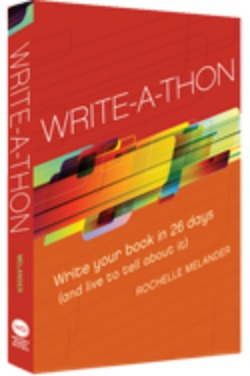
Rochelle Melander, ‘Write-A-Thon: Write your book in 26 days (and live to tell about it)’ – A Review by James Smith

“You have to do the work. Tired, angry, worried or overwhelmed: You need to write. You have to work in the midst of your complicated life. There will never be a perfect time to write the book bubbling within you. Sometimes you just have to work at the big things while the little ones pile up around you.” (p. 6)

I would like to take the time to explore Rochelle Melander’s Write-A-Thon: Write your book in 26 days (and live to tell about it) from the perspective of a PhD student. At the start of a new year and at the beginning of many new ventures in writing, this book has provided many timely pieces of advice. The merits of the Melander’s book for the PhD student are two-fold: First, Melander sets out to disabuse any potential writer of every excuse that one could possibly think of for delaying, procrastinating or otherwise sabotaging the decision to write. As I’m sure we can all agree PhD students are serial offenders in this regard. Second, the book sets out a veritable arsenal of tools for shaping and creating a book-length piece of writing, many (although not all) of which are highly relevant for PhD writing. The book shames the tardy writer into action while simultaneously encouraging strategies to ease the strain of writing. It is a toolbox full of useful devices for writing, some highly relevant to the academic, others less so.

During the month of November of last year, the PhD2published community embraced AcBoWriMo (Academic Book Writing Month for the uninitiated) with great gusto, featuring a series of blog posts and a vigorous #AcBoWriMo tag on Twitter. As part of the experience, Charlotte presented us with a series of four posts based around Write-A-Thon (i ii iii iv), each of which I highly recommend that you read. As you will apprehend, the book is extremely good at seeking out excuses and stripping them away, anticipating your paranoia and soothing it, pre-empting your mistakes, correcting your mistakes, anticipating your confusion and providing answers. Writing is an inherently uncertain endeavour, and yet Melander’s confidence in the power of human motivation provides many useful strategies for boosting one’s writing. The blurb promises to teach the reader how to start out well prepared, maintain their pace and bask in their accomplishment.

Although aimed at anyone interested in writing any kind of book and inspired by the annual NaNoWriMo (National Novel Writing Month) initiative, Write-A-Thon has several virtues that recommend itself to the graduate student, early career academic or seasoned academic in need of motivation and inspiration in the face of a writing project. This recommendation turned out to be highly convenient, for it helped me write this review. I turned (not without a certain amount of irony) to the first section of the book I was to review, entitled ‘Attitude Training: Get Rid of the Excuses’ (pp. 9-25). It helped; a fact to which the existence of this review can attest. Melander always seems to have something to say to the PhD student, a category of writers constantly plagued with motivational problems and doubts. We all need a constant stream of encouragement and exhortations to write when struggling with a thesis deadline. The section ends with a section on the healing power of writing, reminding us that writing need not be a chore. As Melander puts it, “Write now, get healthy!” (p. 25). On the topic of health, the PhD student will also be drawn to a section entitled ‘Life Training: Schedule the Marathon’ (pp. 103-129) in which the reader can find useful advice on shaping one’s writing environment, measuring one’s progress and maintaining one’s schedule.

Melander offers a great deal to any PhD student faced with one of those inevitable ‘crunch time’ moments when there appears to be far too many words to write and not enough hours in the day in which to write them. Open Write-A-Thon on any given page and you will find a tool to write coupled with games, tricks and strategies to avoid commonly encountered pitfalls in writing. In the second part of the book, entitled ‘The Write-A-Thon’, the book schools the reader in the avoidance of writing phenomena such as ‘Monkey Mind’ (p. 138). Although a great deal of the material in this section is perhaps more suitable for fiction writing, it covers many problems shared by all writers regardless of background. This was a refreshing dose of perspective, for it reminded me that all writers, any writers, experience these problems regardless of what they are attempting to write. The final section of the book, entitled ‘Recovery’ (pp. 202-218), contains some general information about revising your writing and pitching it to a publisher. Whereas the PhD student would perhaps be better served by the more specific advice in ‘How to Publish your PhD’ by Sarah Caro, there is some good common sense information in this section that should be of interest to the PhD student.

In summary, Melander’s book contains much of interest to the doctoral student in need of strategies specifically tailored to the purpose of writing a great deal in a very short amount of time. Melander functions as a writing guru and a source of moral support in equal measure. Although the timeframe and the nature of the project proposed by the NaNoWriMo style project of the book differs from the PhD experience, the reader will find that Write-A-Thon has a great many features that will appeal. I will leave you, as the book does, with a piece of advice that we should all keep in mind.

“And so, dear writers, the journey is not over. You have finished one race. Be proud and happy for what you have accomplished. But know this: You have more races to run, more books to write. Take a break, celebrate, and begin again!” (p. 219).

Josie Dixon – From Planet PhD to Destination Publication: A Traveller’s Guide. Part 1. Ivory Tower vs Shopping Mall

This post is the first in a series by Josie Dixon, a consultant with 15 years’ experience in academic publishing, as Senior Commissioning Editor at Cambridge University Press and Publishing Director for the Academic Division at Palgrave Macmillan.  She now runs her own business, Lucian Consulting, and gives training workshops on publishing and other forms of research communication for postgraduates, postdocs and staff in over 50 universities internationally, alongside her training and consultancy work in the publishing industry. In this new set of blog posts for PhD2Published, Josie examines some of the polarities between Planet PhD and the world of publishing, and offers strategies for how to bridge the gap. 

In this series:

  1. Ivory Tower vs Shopping Mall
  2. Micro vs Macro
  3. Passenger vs Driver
  4. Process vs Afterlife
  5. Features vs Benefits

There’s a great article by Peter Barry which appeared in the Times Higher Education under the headline ‘Footnotes and Fancy Free’.  Among many useful insights, Barry caricatures very effectively two opposing worldviews or value systems in academic research.  For residents of the Ivory Tower, it’s all about pure intellectual excellence, never mind who (or what) it’s for.  For those who inhabit the Shopping Mall, there needs to be a clear benefit to an identifiable audience, and ultimately some form of commercial value for a paying market.  Barry diagnoses a fundamental problem in the fact that all too often PhDs (particularly in the arts and humanities) are supervised and examined by Ivory Tower standards, yet at the postdoctoral stage, researchers are suddenly pitched headlong into the Shopping Mall.  This is of necessity where publishers live, since their business is dependent on realising a commercial return on the investment that is made in every new publication.

Profitability – at whatever level – is key to a sustainable publishing business, and even university presses (whose non-profit model is the least commercially driven in the industry) can’t avoid this fundamental pillar of the Shopping Mall.  The sources of subsidy which have long shored up large sectors of university press publishing (particularly in the US) are running dry, and editors are looking ever harder at the commercial factors which position a prospective publication on the right or wrong side of the margins of viability.  At the other end of the scale, many major players in the academic publishing industry are fully commercial businesses accountable to shareholders with steep demands when it comes to the return on their investment.  It’s a fine balancing act to reconcile editorial values based on intellectual quality (those ivory tower sympathies which bring graduates into publishing in the first place) with tough financial imperatives, but that’s the daily challenge for commissioning editors at commercial academic presses like Palgrave Macmillan, Routledge, Blackwell, Ashgate or Continuum, to name only a few.

So the first stage in your journey from PhD to publication has to involve stepping out of the Ivory Tower and into the Shopping Mall, in order to see your project from the publisher’s point of view.  Here are five key questions to ask yourself, to help you to take this more commercial perspective on your research:

  1. What’s your USP (unique selling point)?  Can you sum up the original contribution of your research in a few accessible sentences, and make it into a selling point?  Imagine a blurb in a publisher’s catalogue – your sales pitch needs to be aimed at non-specialists in the book trade and the library supply business, not your end-user academic readers.
  2. Who are you writing for?  Publishers respond best to projects pitched at a well-defined readership.  Beware losing focus by trying to be all things to all people, either in terms of level (a research monograph is not a textbook or a trade book) or subject (interdisciplinary projects run the risk of being peripheral to several markets and central to none).
  3. Why do they need it (and will they pay)?  In tough market conditions like the present, there is very little room for discretionary, nice-to-have purchases.  Even libraries are having to prioritise very carefully after severe budget cuts, so there must be a clear demand for your research before they will consider buying it.  This is closely related to the next question:
  4. What benefit does your research provide?  (not to you, but to the reader!) Think about the applications of your research – how will it be used, and where will it make a difference?  Is there a problem (intellectual or otherwise) to which your research offers a solution?  Are there methodological tools or reference features which your readers will find helpful?  Publishers are looking for something more tangible than ‘another new interpretation’ of the subject, or research that ‘fills a gap’.
  5. How international is its focus and appeal?  The UK is a small market, and these days even the US is insufficient to carry the commercial viability of an academic publication.  Publishers will be thinking about the appeal to international markets, so you need to, too.

For more detailed guidance on these and other factors essential to maximising your chances of success in a competitive publishing climate, come to one of Josie’s publishing workshops or contact her direct. 

General

PhD2Published – an academic writing and publishing support community

‘Publish or perish’ is a well worn directive in academia, less frequently touted is quality advice on how! PhD2Published was established in 2010 as a resource and community designed to channel academic publishing advice. Its founder and director, Charlotte Frost, had no clear publishing strategy on completion of her PhD and wondered if she was alone in experiencing that knowledge gap…

Today PhD2Published boasts hundreds of blog posts on various aspects of academic publishing from writing book proposals to dealing with reviewers comments on a journal article; presenting papers at conferences; publishing with open access journals; and professional networking – as well as countless tips on writing productivity. We receive well over 10,000 unique visitors a month and have a Twitter following of more than 15,000 people. Charlotte has presented PhD2Published at institutions including the Australian National University, Duke University and University College London and we have been featured in publications including Chronicle of Higher Education, the Guardian and Inside Higher Ed.

From the start PhD2Published was designed to promote writing and publishing skills at every level. Contributors can target the publishing issues most pertinent to their work, and develop a publishing strategy with an advisory network of thousands of experts. By writing across a range of social media platforms they can develop transferable skills in communicating on different platforms with different audiences. While managing editors can gain experience in running an open research resource.

In 2011 we launched the equally successful Academic Writing Month (or #AcWriMo) which is an annual academic write-a-thon held every November. It was inspired by NaNoWriMo (National Novel Writing Month) and unites people by the common goal of developing better and more sustainable writing habits. This project has upwards of 1000 participants every year, from more than 15 different countries, producing hundreds of journal articles, thousands of blog posts on academic writing techniques, and our #AcWriMo hashtag has a reach of over 300,000.

Academia is changing. With the arrival of the internet and digital publishing technologies, the limiting nature of traditional academic publishing and the potential for alternative models has been exposed. To date there have been numerous projects experimenting with new technology to augment and re-engineer the academic text, addressing everything from open access to peer review, networked and collaborative writing, data aggregation and visualisation, format adaptability and annotation (Charlotte even launched her own research project investigating the future of the art history book). Meanwhile the university system itself, which many argue was designed to train citizens and scholars for the working environments of the past, is under tremendous pressure to evolve. Now more than ever we need to understand all the implications of the publishing choices we make.

In 2015, after a whirlwind 5 years of operation, to better deal with these shifts and more fully meet the requirements of our committed community, we substantially restructured our website. We’d like to thank everyone who has contributed to PhD2Published over the years. It has grown beyond anything Charlotte expected when she first made those embarrassing video blogs from her glittery study. And we couldn’t have done that without your hard work and kindness. We hope you’ll help us make the next 5 years just as fruitful for the whole community and welcome all your ideas and suggestions for features and content for the future.

← Previous Entries
Academic Writing Month
TOOLKITS TOOLKITS LEADER BOARD LEADER BOARD LATEST LATEST ABOUT ABOUT
Latest Tweets
  • Tweet Avatar
    PhD2Published
    @PhD2Published
    Three Steps for Creating a New Habit https://t.co/19w1VWh4WV via chronicle

    10 years ago
    1 retweet
  • Tweet Avatar
    PhD2Published
    @PhD2Published
    PhD2Published Daily is out! https://t.co/UwsOH8hZyH Stories via @AJHUD @empathywarrior @pubsandpubs

    10 years ago
    2 retweets
  • Tweet Avatar
    PhD2Published
    @PhD2Published
    New on our Facebook page: https://t.co/QtGGdNn7Cf

    10 years ago
    1 retweet
Facebook
View on Facebook

PhD2Published shared a link.

9 years ago

PhD2Published

Do Your Students Take Good Notes? – ProfHacker - Blogs - The Chronicle of Higher Education

www.chronicle.com

 
View on Facebook
·Share

PhD2Published

9 years ago

PhD2Published

Tip off the press' - #Hackademic #WritingTip by Jesse Stommel & Charlotte Frost: www.phd2published.com/2014/04/30/hackademic-guide-to-networking-tip-off-the-press/ #AcWri #AcademicNetworking ... See MoreSee Less

View on Facebook
·Share

PhD2Published shared a link.

9 years ago

PhD2Published

Back Up Your Files Now – ProfHacker - Blogs - The Chronicle of Higher Education

www.chronicle.com

 
View on Facebook
·Share

Facebook Twitter RSS
All rights reserved by PhD2Published